
85 lines
5.7 KiB
Markdown
85 lines
5.7 KiB
Markdown
# base
|
|
|
|
[](https://github.com/ublue-os/base/actions/workflows/build.yml)
|
|
|
|
A base image with a (mostly) stock Fedora Silverblue. Help us make a sweet base image: Pull requests and improvements appreciated and encouraged! Scroll to the bottom to see how to make your own!
|
|
|
|
## Usage
|
|
|
|
Warning: This is an experimental feature and should not be used in production, try it in a VM for a while, you have been warned!
|
|
|
|
sudo rpm-ostree rebase ostree-unverified-registry:ghcr.io/ublue-os/base:latest
|
|
|
|
We build date tags as well, so if you want to rebase to a particular day's release:
|
|
|
|
sudo rpm-ostree rebase ostree-unverified-registry:ghcr.io/ublue-os/base:20221217
|
|
|
|
The `latest` tag will automatically point to the latest build.
|
|
|
|
## Features
|
|
|
|
- Start with a base Fedora Silverblue 37 image
|
|
- Removes Firefox from the base image
|
|
- Adds the following packages to the base image:
|
|
- distrobox and gnome-tweaks
|
|
- Sets automatic staging of updates for the system
|
|
- Sets flatpaks to update twice a day
|
|
- Everything else (desktop, artwork, etc) remains stock so you can use this as a good starting image
|
|
|
|
## Applications
|
|
|
|
- All applications installed per user instead of system wide, similar to openSUSE MicroOS, they are not on the base image. Thanks for the inspiration Team Green!
|
|
- Mozilla Firefox, Mozilla Thunderbird, Extension Manager, Libreoffice, DejaDup, FontDownloader, Flatseal, and the Celluloid Media Player
|
|
- Core GNOME Applications installed from Flathub
|
|
- GNOME Calculator, Calendar, Characters, Connections, Contacts, Evince, Firmware, Logs, Maps, NautilusPreviewer, TextEditor, Weather, baobab, clocks, eog, and font-viewer
|
|
|
|
## Further Customization
|
|
|
|
The `just` task runner is included for further customization after first boot.
|
|
It will copy the template from `/etc/justfile` to your home directory.
|
|
After that run the following commands:
|
|
|
|
- `just` - Show all tasks, more will be added in the future
|
|
- `just bios` - Reboot into the system bios (Useful for dualbooting)
|
|
- `just changelogs` - Show the changelogs of the pending update
|
|
- Set up distroboxes for the following images:
|
|
- `just distrobox-boxkit`
|
|
- `just distrobox-debian`
|
|
- `just distrobox-opensuse`
|
|
- `just distrobox-ubuntu`
|
|
- `just setup-flatpaks` - Install a selection of flatpaks, use this section to add your own apps
|
|
- `just setup-gaming` - Install Steam, Heroic Game Launcher, OBS Studio, Discord, Boatswain, Bottles, and ProtonUp-Qt. MangoHud is installed and enabled by default, hit right Shift-F12 to toggle
|
|
- `just update` - Update rpm-ostree, flatpaks, and distroboxes in one command
|
|
|
|
Check the [just website](https://just.systems) for tips on modifying and adding your own recipes.
|
|
|
|
|
|
## Verification
|
|
|
|
These images are signed with sisgstore's [cosign](https://docs.sigstore.dev/cosign/overview/). You can verify the signature by downloading the `cosign.pub` key from this repo and running the following command:
|
|
|
|
cosign verify --key cosign.pub ghcr.io/ublue-os/base
|
|
|
|
If you're forking this repo you should [read the docs](https://docs.github.com/en/actions/security-guides/encrypted-secrets) on keeping secrets in github. You need to [generate a new keypair](https://docs.sigstore.dev/cosign/overview/) with cosign. The public key can be in your public repo (your users need it to check the signatures), and you can paste the private key in Settings -> Secrets -> Actions.
|
|
|
|
# Making your Own
|
|
|
|
1. Clone this repo
|
|
1. Ensure your [GitHub Actions](https://docs.github.com/en/repositories/managing-your-repositorys-settings-and-features/enabling-features-for-your-repository/managing-github-actions-settings-for-a-repository) and [GitHub Packages](https://docs.github.com/en/packages) are set up and enabled
|
|
1. Change the [image name in the action](https://github.com/ublue-os/base/blob/aab8078cfdc7d2354e057a0ca4771d3a53d2df4c/.github/workflows/build.yml#L14) to match what you want to call your image
|
|
- Changing it to `IMAGE_NAME: beagles` will name the final image: `ghcr.io/yourusername/beagles` - so you'll likely want that to be your cool name instead of `base`
|
|
1. Generate a keypair
|
|
- Install the [cosign CLI tool](https://edu.chainguard.dev/open-source/sigstore/cosign/how-to-install-cosign/)
|
|
- Run `cosign generate-key-pair`
|
|
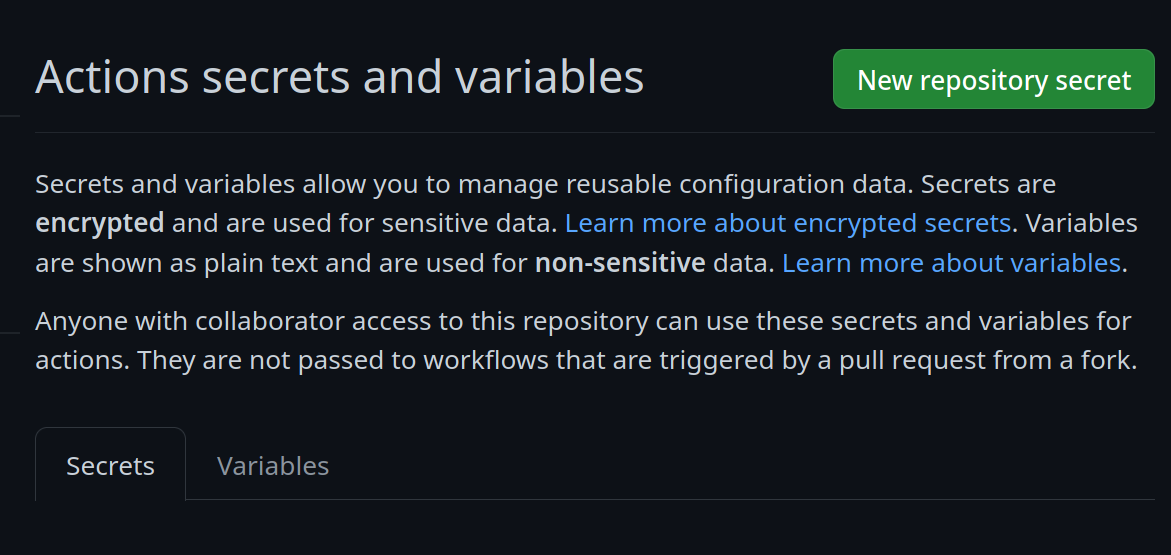
- In your repository settings, under Secrets and Variables -> Actions
|
|
- Create a new secret:
|
|
|
|
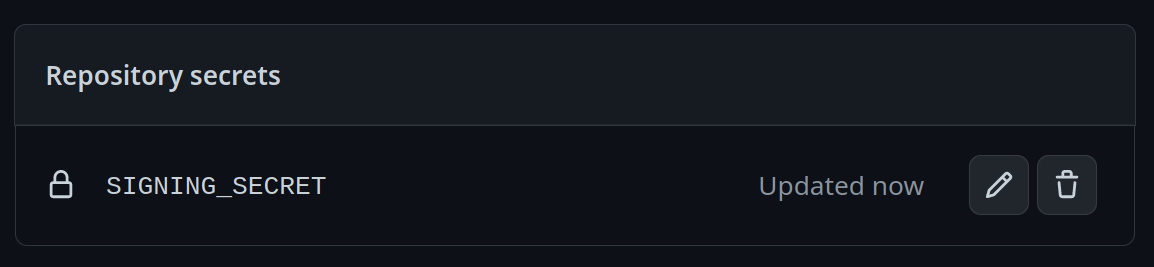
- Call it `SIGNING_SECRET` and then paste the contents of `cosign.key` into the field and save it. Be careful to make sure it's the .key file and not the .pub file. It should look like this:
|
|
|
|
- Copy the `cosign.pub` key into the root of your repository, replacing the key you got from here.
|
|
- Copy the instructions from the verification section of this readme and make adjustments to your container url. This part is important, users must have a method of verifying the image. The linux desktop must not lag behind in cloud when it comes to supply chain security, so we're starting right from the start! (Seriously don't skip this part)
|
|
1. Start making modifications to your Containerfile!
|
|
- Change a few things and keep an eye on your Actions and Packages section of your repo, you'll generate a new image one every merge and additionally every day.
|
|
- Follow the instructions at the top of this repo but this time with the `ghcr.io/yourusername/beagles` url and then you'll be good to go!
|
|
- Hang out in the [discussions forums](https://github.com/orgs/ublue-os/discussions) with others to share tips and get help, enjoy!
|