
84 lines
5.3 KiB
Markdown
84 lines
5.3 KiB
Markdown
# base
|
|
|
|
[](https://github.com/ublue-os/base/actions/workflows/build.yml)
|
|
|
|
A base image with a (mostly) stock Fedora Silverblue. Help us make a sweet base image: Pull requests and improvements appreciated and encouraged! Scroll to the bottom to see how to make your own!
|
|
|
|
## Usage
|
|
|
|
Warning: This is an experimental feature and should not be used in production, try it in a VM for a while, you have been warned!
|
|
|
|
sudo rpm-ostree rebase ostree-unverified-registry:ghcr.io/ublue-os/base:latest
|
|
|
|
We build date tags as well, so if you want to rebase to a particular day's release:
|
|
|
|
sudo rpm-ostree rebase ostree-unverified-registry:ghcr.io/ublue-os/base:20221217
|
|
|
|
The `latest` tag will automatically point to the latest build.
|
|
|
|
## Features
|
|
|
|
- Start with a base Fedora Silverblue 37 image
|
|
- Removes Firefox from the base image
|
|
- Adds the following packages to the base image:
|
|
- distrobox and gnome-tweaks
|
|
- Sets automatic staging of updates for the system
|
|
- Sets flatpaks to update twice a day
|
|
- Everything else (desktop, artwork, etc) remains stock so you can use this as a good starting image
|
|
|
|
## Applications
|
|
|
|
- All applications installed per user instead of system wide, similar to openSUSE MicroOS, they are not on the base image. Thanks for the inspiration Team Green!
|
|
- Mozilla Firefox, Mozilla Thunderbird, Extension Manager, Libreoffice, DejaDup, FontDownloader, Flatseal, and the Celluloid Media Player
|
|
- Core GNOME Applications installed from Flathub
|
|
- GNOME Calculator, Calendar, Characters, Connections, Contacts, Evince, Firmware, Logs, Maps, NautilusPreviewer, TextEditor, Weather, baobab, clocks, eog, and font-viewer
|
|
|
|
## Further Customization
|
|
|
|
The `just` task runner is included for further customization after first boot.
|
|
It will copy the template from `/etc/justfile` to your home directory.
|
|
After that run the following commands:
|
|
|
|
- `just` - Show all tasks, more will be added in the future
|
|
- `just bios` - Reboot into the system bios (Useful for dualbooting)
|
|
- `just changelogs` - Show the changelogs of the pending update
|
|
- Set up distroboxes for the following images:
|
|
- `just distrobox-boxkit`
|
|
- `just distrobox-debian`
|
|
- `just distrobox-opensuse`
|
|
- `just distrobox-ubuntu`
|
|
- `just setup-flatpaks` - Install a selection of flatpaks, use this section to add your own apps
|
|
- `just setup-gaming` - Install Steam, Heroic Game Launcher, OBS Studio, Discord, Boatswain, Bottles, and ProtonUp-Qt. MangoHud is installed and enabled by default, hit right Shift-F12 to toggle
|
|
- `just update` - Update rpm-ostree, flatpaks, and distroboxes in one command
|
|
|
|
Check the [just website](https://just.systems) for tips on modifying and adding your own recipes.
|
|
|
|
|
|
## Verification
|
|
|
|
These images are signed with sisgstore's [cosign](https://docs.sigstore.dev/cosign/overview/). You can verify the signature by downloading the `cosign.pub` key from this repo and running the following command:
|
|
|
|
cosign verify --key cosign.pub ghcr.io/ublue-os/base
|
|
|
|
If you're forking this repo you should [read the docs](https://docs.github.com/en/actions/security-guides/encrypted-secrets) on keeping secrets in github. You need to [generate a new keypair](https://docs.sigstore.dev/cosign/overview/) with cosign. The public key can be in your public repo (your users need it to check the signatures), and you can paste the private key in Settings -> Secrets -> Actions.
|
|
|
|
# Making your Own
|
|
|
|
1. Clone this repo
|
|
1. Ensure your [GitHub Actions](https://docs.github.com/en/repositories/managing-your-repositorys-settings-and-features/enabling-features-for-your-repository/managing-github-actions-settings-for-a-repository) and [GitHub Packages](https://docs.github.com/en/packages) are set up and enabled
|
|
1. Change the [image name in the action](https://github.com/ublue-os/base/blob/aab8078cfdc7d2354e057a0ca4771d3a53d2df4c/.github/workflows/build.yml#L14) to match what you want to call your image
|
|
- Changing it to `IMAGE_NAME: beagles` will name the final image: `ghcr.io/yourusername/beagles` - so you'll likely want that to be your cool name instead of `base`
|
|
1. Generate a keypair
|
|
- Install the [cosign CLI tool](https://edu.chainguard.dev/open-source/sigstore/cosign/how-to-install-cosign/)
|
|
- Run `cosign generate-key-pair`
|
|
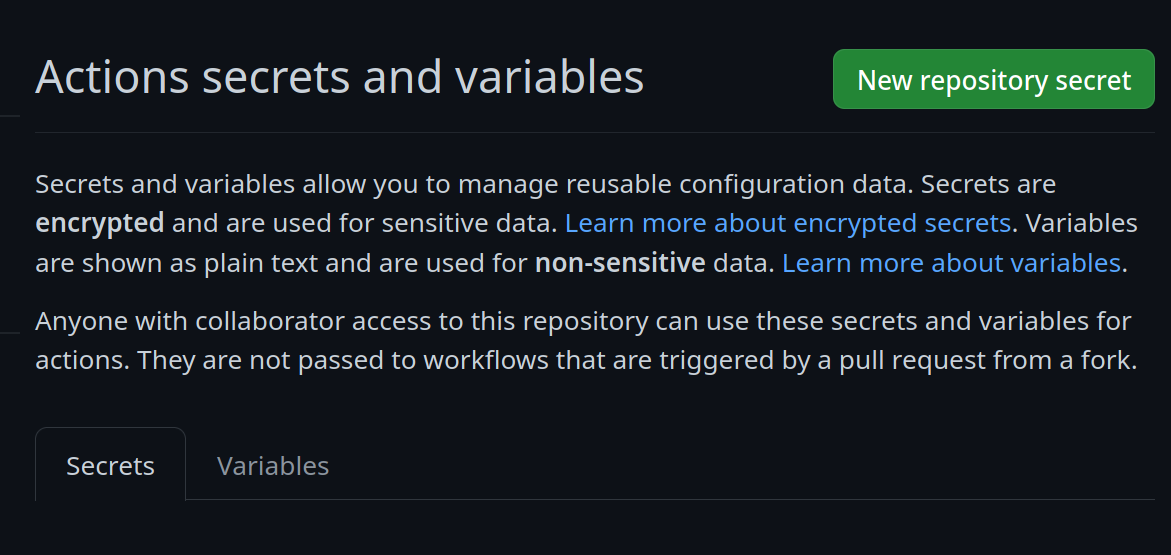
- In your repository settings, under Secrets and Variables -> Actions
|
|
- Create a new secret:
|
|
|
|
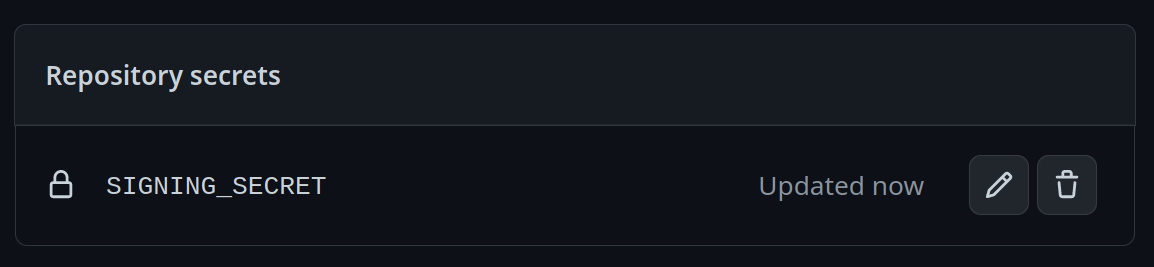
- Call it `SIGNING_SECRET` and then paste the contents of `cosign.key` into the field and save it. Be careful to make sure it's the .key file and not the .pub file. It should look like this:
|
|
|
|
- Copy the `cosign.pub` key into the root of your repository, replacing the key you got from here.
|
|
1. Start making modifications to your Containerfile!
|
|
- Change a few things and keep an eye on your Actions and Packages section of your repo, you'll generate a new image one every merge and additionally every day.
|
|
- Follow the instructions at the top of this repo but this time with the `ghcr.io/yourusername/beagles` url and then you'll be good to go!
|
|
- Hang out in the [discussions forums](https://github.com/orgs/ublue-os/discussions) with others to share tips and get help, enjoy!
|